PCB
When you have a board with no clear diagram
It helps you identify components, likely circuit stages and useful measurement points so you can start with better criteria.
Upload a PCB photo, look up a component, enter a DTC or describe the fault. AutoBoard gives you useful hypotheses, measurement points, expected values and a clearer verification path so you can move faster without wasting time on generic searches.
Create your account in 30 seconds. 2 free tokens after email verification. No card required. Tokens never expire.
Real case
We used a real photo of a Nissan Versa BCM built by Calsonic Kansei and show a real screenshot from the AutoBoard app result. The goal is not to promise magic, but to show the kind of concrete support a technician actually gets.
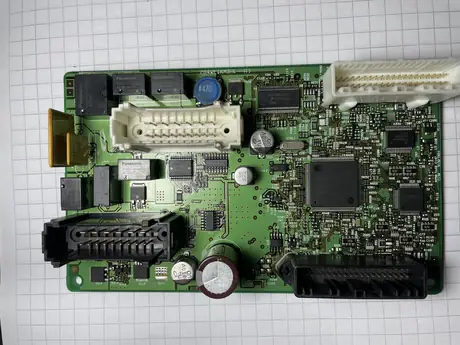
This is the same real photo used in the test. You can see a BCM with the Calsonic Kansei logo, multiple connectors, Panasonic relays, filter capacitors and the main MCU in the center.
It identified the module context, the board manufacturer, the main MCU, Panasonic relays, critical capacitors and the main power entry area.
It does not stop at naming parts. It prioritizes what to measure first, what value to expect and what kind of fault could explain the module behavior.
Start with real criteria before desoldering, replacing or condemning the board, especially when no clear diagram is available.
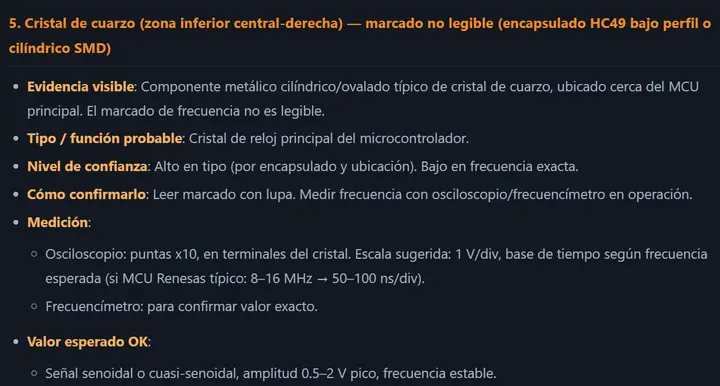
Real excerpt from the result shown inside AutoBoard from that image. It was cropped for the landing page, but it is not a mockup or hand-written simulation.
The analysis highlighted the main MCU, Panasonic ACTB relays, filter capacitors and the fused power entry line as the most critical points.
1. Fuse and main power input. 2. Filter capacitors. 3. Output relays. That order already gives the technician a concrete starting point on the bench.
A real guide for measuring with better judgment: what to inspect, what is expected and what each fault can affect in lights, locks, windows, communication or immobilizer behavior.
What it solves
AutoBoard is not trying to replace your judgment. It is designed to help you organize the analysis, discard faster and prioritize what to measure first.
It helps you identify components, likely circuit stages and useful measurement points so you can start with better criteria.
Look up function, pinout, references and how to measure the component before replacing or discarding it.
You get a more technical review path that links the DTC to module electronics instead of stopping at the generic description.
Useful for organizing hypotheses around symptoms such as no communication, active immobilizer, dead output, short or abnormal current draw.
It gives you a second layer of technical judgment to decide whether to measure, compare or go deeper before changing parts.
Who it is for
The product is aimed at people dealing with modules, DTCs, components and electronic faults that are hard to pin down in day-to-day work.
AutoBoard gives you function, pinout, and measurement guidance so you stop losing bench time on generic searches.
It helps you prioritize measurements and order hypotheses without guessing or desoldering blind.
It gives board context, key checkpoints, and risks before you touch memory or clone.
A more technical guide than a general AI to decide what to measure first.
Capabilities
From PCB images and DTCs to complex symptoms. The focus is operational usefulness, not inflated promises.
Upload a board photo to get component identification, likely function, suggested measurements and failure signs to inspect first.
1 or 2 tokensEnter the component code or package marking to get function, pinout, references and a practical measurement guide.
1 tokenAnalyze P, B, C or U codes with a workshop-oriented explanation: likely causes, affected stages and a verification route.
1 tokenDescribe the fault and get a more developed answer to organize hypotheses, prioritize measurements and unlock complex cases.
3 tokensVisual add-on for users who buy the 150-token pack: waveforms and references to keep validating on the bench.
Included in pack 150Technical guides
The guide hub is already live, but for now the public articles are still published in Spanish. We will expand public English content gradually.
You can already browse the public library if you are comfortable reading Spanish, while we build the English content layer carefully.
The goal is to translate and expand guides with the same technical standard, not with shallow machine copy.
How it works
You start by creating your account. Then you submit your query and get an output built to help you measure, validate and move faster.
Upload a clear board photo, enter a component code, submit a DTC or describe the module symptom.
The tool crosses your input with automotive technical context to suggest hypotheses, related components and useful checks.
You receive component function, likely failures, measurement points, expected values and a recommended next step.
Save the case, compare it with other analyses and keep refining the diagnosis with new questions.
Pricing
Buy tokens and use them when you need them. You start with 2 free tokens when you create your account and verify your email.
Starter test
2 free tokens to try one full board analysis or combine two quick queries after verifying your email.
Pack 30 tokens
Approx. ~US$28
30 tokens for ongoing use without a subscription trap.
Pack 150 tokens + Manual
Approx. ~US$111
150 tokens with the best token price and access to the measurement manual.
1 token = quick board, component or DTC query · 2 tokens = full board analysis · 3 tokens = symptom-based diagnosis · Approximate USD reference using ~CLP 900 per US$1 · If you already have an account, sign in and coordinate payment by WhatsApp/PayPal.
FAQ
The goal is to make clear what the tool does, where it adds value and how it should be used in a real workshop context.
No. AutoBoard is designed as support to organize hypotheses, identify components and define better verification steps. The final decision still belongs to the technician.
It is focused on automotive electronic modules and related diagnostic questions. The clearer the input, the better the answer will be.
A sharp board image, the correct component code, the exact DTC or a concrete symptom description. The more useful context goes in, the better the output comes back.
Use it to accelerate analysis, validate hypotheses and prioritize measurements. In complex cases it adds more value as technical support than as a closed answer.
No. You buy tokens and use them when you need them. Tokens do not expire.
If it saves you a long search, a poorly prioritized measurement or helps you unlock a real bench case, the return can show up very quickly.